


RxSaver – Prescription Coupons
4.53.31K Reviews
App Specs
- Version
- 8.0.4
- Updated On
- License
- Free
- Downloads
- 1,000,000+
- Developer
- RxSaver, Inc.
- Categories
- Medical
- Platform
- Android, iOS
Screenshots
 Analysis by AppCompare
I approach prescription savings apps with one practical question: will they help me make a better choice before I reach the pharmacy counter, without turning a simple refill into a research project? RxSaver – Prescription Coupons is built around that moment. It gives people a way to look up medication prices and compare nearby options, which can be useful when the amount due is higher than expected or when regular prescriptions make pharmacy costs a recurring concern.
RxSaver is a free medical app from RxSaver, Inc. Its focus is narrower than a general health app: it is about prescription costs, coupons, and checking available prices. That focus is a strength if saving on medication is your immediate goal, but it also sets expectations. I would treat it as a comparison tool to consult before paying, not as a substitute for medical advice or a guarantee that every prescription will be cheaper.
A quick search is useful, but the counter is not the best time to start
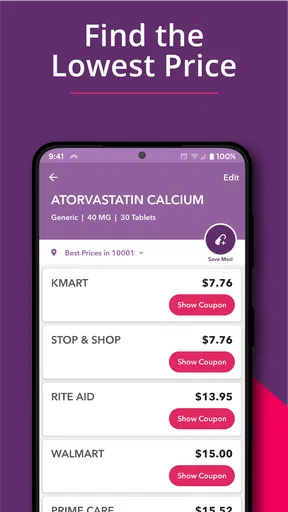
For speed, the most sensible workflow is to search before leaving home. The app’s core task is straightforward: enter a medication name, review the listed options, and decide whether a different pharmacy is worth considering. A quick search can save time later, but the practical result depends on finding a price and location that suit your situation. I would not assume every search will produce an instant, clearly better deal.
That distinction matters if you are already standing in line. A result may point you toward a nearby alternative, but switching pharmacies can mean extra travel or another errand. I’d compare the potential saving with the time and distance involved, rather than choosing the lowest number on screen automatically. For a refill I know I’ll need soon, checking a little ahead gives me room to weigh the options calmly.
When you use it repeatedly, keep the comparison focused
RxSaver makes more sense as part of a repeat routine than as something I open only after a surprise bill. If you take a medication regularly, saving it as a favorite can make a later price check more convenient. Price alerts can also help you notice changes without having to remember to search at exactly the right moment. Those tools are most useful when you still verify the current offer before acting; a previous result is a reason to check, not a promise that the same price will be available every time.
A useful habit is to compare one prescription at a time and note which nearby option is genuinely convenient for you. If several people in a household have prescriptions, or if your medication list is long, it is tempting to treat the app as a complete household tracker. I would keep the task narrower: use it to investigate a particular purchase, then confirm the details that matter for that pickup. That keeps the savings search manageable instead of adding another complicated system to your routine.
Reliability means checking the offer before relying on it
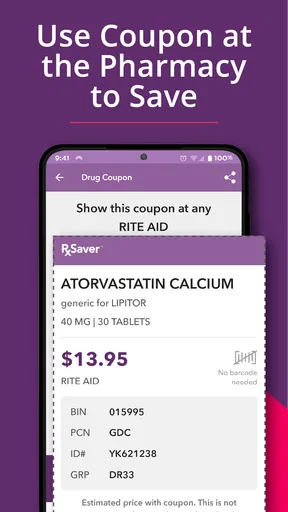
I would use the app to guide a decision, while leaving a little room for differences between a displayed price and what happens at checkout. The app presents comparisons and a discount card, but the useful question for me is whether the option applies to the prescription I’m filling and the pharmacy I plan to visit. Before making a special trip, I’d check the details in the app and be prepared to ask the pharmacy to confirm the price when I arrive.
Worth Reading Before You Choose

Flipboard Shows What News Apps Must Do Beyond the Feed

Switching to Android Auto Means Rethinking Your Driving Routine

Google Calendar Makes a Crowded Week Easier to Manage

Ludo King Makes the Most of the Minutes Between Plans

Baby Panda World Brings Quick Play to Modern Phones, but Its Game Library Feels Busy

ESPN’s Live Game View Makes Following Close Games Easier
That extra check is especially worthwhile when the cost is important to your budget. A coupon can be helpful, but it does not replace confirming how the pharmacy will process it for your purchase. I also would not make a treatment decision based on a price result: questions about a medication, its dose, or whether it is appropriate belong with a qualified health professional. RxSaver is useful for comparing costs, not for deciding what you should take.
What to expect on your phone
The app has a focused job, so I would expect its everyday use to be lighter than a service built around video, large files, or constant background activity. Still, actual speed and responsiveness can depend on the phone and connection. Since price searches rely on internet access, I would do them before heading into a place where reception may be poor. If a result takes longer than expected, checking the connection and trying again later is more sensible than assuming the app has found a definitive answer.
RxSaver is available for devices running Android 8.0 or later, which is worth checking before installing it on an older phone. The current version is 8.0.1. If your device cannot run it, or if you would rather not use a phone at the pharmacy, you can still ask the pharmacy about its available pricing options directly. The app is most convenient when your phone is usable, connected, and easy to consult during the shopping process.
It has a 4.6 average from around 11,000 ratings, and more than a million installs. I see that as a sign that many people have found the idea useful, not a reason to expect identical results for every prescription. It is rated for everyone, but the financial decisions it supports are most relevant to people paying for medication and looking for a way to compare costs.
Picture this: you're at the pharmacy counter, and the price of your prescription makes your heart skip a beat. That's where RxSaver – Prescription Coupons comes into play. This nifty app is designed to help you find the best deals on medications, and believe me, it's a game-changer.
Finding Your Way Around RxSaver
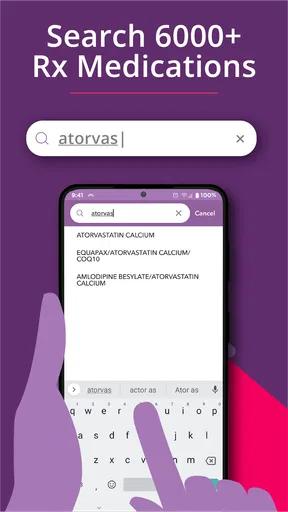
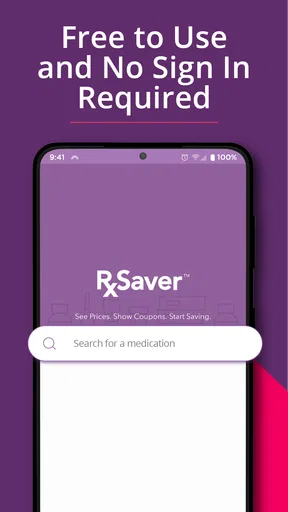
First things first, let's talk about the user experience. Downloading and setting up RxSaver is as easy as pie. Available on both Android and iOS, the app's interface is clean and intuitive, so you won't need a PhD in technology to navigate through it. Once you open the app, you're greeted with a straightforward search bar where you can enter the name of your medication and see results faster than you can say "discount."
How It Works
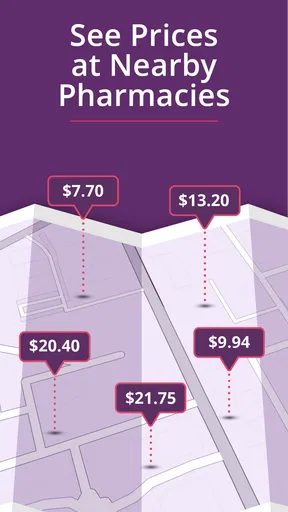
Now, here's where the magic happens. RxSaver searches through a database of pharmacies and presents you with a list of prices. It's like having your personal coupon book right in your pocket. You can compare prices from various pharmacies in your area, making it super easy to find the best deal. The app even shows you the distance to each pharmacy, which is a nice touch if you're looking to save on gas, too. Trust me, those savings can add up!
The Features That Shine
One of the standout features of RxSaver is its ability to save your favorite medications. This means that if you're someone who regularly refills prescriptions, you can quickly access the latest prices without having to search all over again. Plus, the app can send you price alerts, which is perfect for keeping an eye on any fluctuations. It's like having a personal shopper who's always on the lookout for the best bargains.
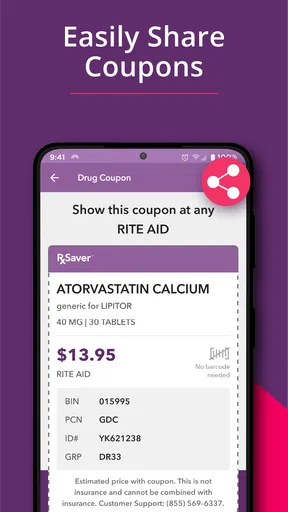
Another cool aspect is the discount card feature. You can use it to get additional discounts at the pharmacy. Just show the card from your phone at checkout, and voila, more savings! And don’t worry if you’re not tech-savvy; the app walks you through every step.
Real-Life Benefits
Using RxSaver is more than just about saving money; it's about peace of mind. Imagine not having to choose between your health and your wallet. Whether you're uninsured or just looking to cut costs, the app is a lifeline. It's particularly beneficial for those with chronic conditions who need regular medication.
One refill, one practical comparison
Consider a realistic errand: you have a prescription to refill, know which medication you need, and want to avoid paying more than necessary. Before setting out, I would search the medication in RxSaver, compare the nearby prices, and check whether the pharmacy with the most appealing result is somewhere I can reasonably visit. If the difference looks worthwhile, I can plan the pickup around another errand. If it does not, I have avoided an unnecessary detour.
That is the kind of everyday decision where this app can help: not by making healthcare costs disappear, but by making a comparison easier to do before paying. The distance information is useful in this calculation. A lower displayed price may not be the best overall choice if reaching that pharmacy takes extra time or fuel, while a slightly less attractive option nearby may be more practical. I’d judge the result as a whole, not by price alone.
Where it fits among other ways to save
The usual alternatives are to pay the price offered at your regular pharmacy, ask staff whether another price or discount is available, or compare costs through other coupon and price-checking services. RxSaver’s advantage is that it brings a medication search, nearby pharmacy comparisons, and a phone-based discount card into one focused process. That can be simpler than calling several locations yourself, especially when you are checking a familiar prescription.
On the other hand, a direct conversation with a pharmacist is better when you need clarification about how a coupon applies or what you will actually pay at pickup. A person who already has a reliable arrangement through insurance or another program may also find that checking an additional coupon does not improve their situation. I would compare the options that apply to my own purchase rather than assume a coupon is automatically the best route.
A small but useful tactic is to check a favorite medication again when you are preparing for a refill, even if you have used the same pharmacy before. Alerts and saved items can reduce the effort of remembering what to search, but they work best as reminders to compare—not as a reason to skip checking the current result. If the app points to a different location, decide whether changing pharmacies is worth the inconvenience before you commit to the trip.
When another approach makes more sense
RxSaver is a good fit for someone who is comfortable using a phone to compare prices and is willing to consider more than one pharmacy. It may be particularly handy for people paying directly for some prescriptions or trying to keep recurring medication costs in view. I would also recommend it to someone who wants a quick starting point for a price conversation with a pharmacy.
I would not rely on it as the only option if you need a guaranteed final total before leaving home, have trouble getting online, or cannot easily travel to an alternative location. In those cases, contacting the pharmacy directly is more dependable for confirming the price and pickup details. And if you are unsure whether a medication or treatment is appropriate, this is not the tool to answer that question; ask a health professional instead.
There is also a practical trade-off for people who prefer to keep errands simple. Comparing prices can take a little attention, and a different pharmacy may mean a separate stop or a change to a routine you already trust. I find the app most worthwhile when the possible saving is meaningful enough to justify that effort. If the result is close to what you already pay, convenience may reasonably win.
Is It Worth It?
In a word, yes. The app is free, and the potential savings could be significant. Even if you're skeptical, it's worth giving it a try. I've personally found it to be a lifesaver, especially when unexpected medical expenses pop up. Plus, knowing you're getting the best deal feels pretty darn good.
If there's a downside, it's that not every medication will have a huge discount. But hey, something is better than nothing, right? Also, the app requires an internet connection, so make sure you’re not running low on data when you’re out and about.
The Final Word
In the ever-expensive world of healthcare, RxSaver – Prescription Coupons is like a breath of fresh air. It's reliable, easy to use, and, most importantly, it helps you keep more money in your pocket. If you haven't tried it yet, do yourself a favor and check it out. Your wallet will thank you!
Ready to start saving? You can download RxSaver on the Google Play Store or the Apple App Store and take the first step towards smarter spending on your prescriptions. Happy saving!
Pros
- Saves money on prescriptions effortlessly.
- Wide coverage of pharmacies and medications.
- User-friendly interface for easy navigation.
- No membership or fees required.
- Personalized savings alerts.
Cons
- Limited to participating pharmacies.
- Requires internet for price checks.
- Occasional inaccurate pricing.
- No option for mail-order prescriptions.
- App may crash on older devices.
FAQs for RxSaver – Prescription Coupons
What is RxSaver and how does it work?
RxSaver is a mobile app designed to help users find prescription medication discounts at nearby pharmacies. By entering the name of the medication and your location, RxSaver compares prices across different pharmacies and provides digital coupons to reduce costs. Users can then present these coupons at the pharmacy to receive the discounted price.
Is RxSaver free to use, or are there any hidden costs?
Yes, RxSaver is completely free to use. There are no hidden costs or subscription fees associated with the app. Users can access it without any charges and benefit from the savings on their prescriptions by utilizing the coupons available through the app.
Can RxSaver be used with insurance or government programs like Medicare?
RxSaver can be used alongside insurance or government programs like Medicare, but it does not replace them. Users should compare the RxSaver price with their insurance co-pay to see which offers a better deal. In some cases, the RxSaver discount may be lower than the insurance co-pay.
Does RxSaver cover all medications, and how accurate is the pricing information?
RxSaver covers a wide range of medications, including both generic and brand-name drugs. While it strives to provide accurate and up-to-date pricing information, prices can change frequently. It’s a good idea to verify prices directly with the pharmacy before making a purchase to ensure accuracy.
What should I do if the pharmacy doesn’t recognize the RxSaver coupon?
If a pharmacy does not recognize the RxSaver coupon, it’s recommended to first ensure the coupon details were entered correctly. If issues persist, contact RxSaver customer support for assistance. Additionally, speaking with the pharmacy staff or trying a different pharmacy listed in the app may resolve the issue.


